
Our Resources

Keeping you informed
KB-012 – Cloud Backup: Check Management Agent Status

1.   Log in to the VSPC Customer Portal

Open your browser and navigate to: https://portal.backup.nymbis.tech

2.   Go to the Discovery Section

In the left‑hand navigation menu, select Discovery.
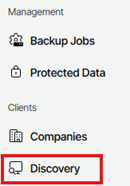
Veeam Service Provider Console Left Navigation Menu Showing The Discovery Option Highlighted Under The Clients Section.

3.   View Discovered Computers

Under Discovered Computers, a list of all machines with installed management agents will be displayed.

Veeam Service Provider Console Showing The Discovered Computers Tab Selected Under Backup Agents, With Toolbar Options Visible For Installing The Backup Agent, Auto Deployment Enabled, Management Agent Actions, And The Download Management Agent Option Displayed.

4.   Verify Connection Status

Check the Connection Status column to ensure that all management agents are listed as Online.

Veeam Service Provider Console Discovered Computers List Showing Two Detected Windows Computers, Both With A Connection Status Of Online, Successful Deployment Status, Healthy Management Agent Status, And Up‑To‑Date Management Agent Versions Displayed In The Table.

5.   Identify Offline Agents

If a management agent displays Inaccessible under Connection Status, the agent is currently offline.

Veeam Service Provider Console Discovered Computers List Showing Two Detected Windows Computers With A Connection Status Of Inaccessible, Successful Deployment Status, Error Indicated For The Management Agent Status, And A Patch Available Message Displayed In The Management Agent Version Column.


NOTE: If the management agent is offline, there will be no remote access to manage the machines from the portal.



Facebook
Twitter
LinkedIn

Subscribe To Our Newsletter

Get updates and learn from the best

More to Explore

Partnerships & Certificates

Speed, Simplicity and Reliability