
1. Log in to the VSPC Customer Portal
Open your browser and navigate to: https://portal.backup.nymbis.tech
2. Go to the Discovery Section
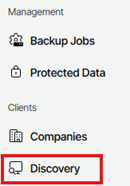
In the left‑hand navigation menu, select Discovery.
3. View Discovered Computers
Under Discovered Computers, a list of all machines with installed management agents will be displayed.

4. Verify Connection Status
Check the Connection Status column to ensure that all management agents are listed as Online.

5. Identify Offline Agents
If a management agent displays Inaccessible under Connection Status, the agent is currently offline.

NOTE: If the management agent is offline, there will be no remote access to manage the machines from the portal.